
ROBATZ editorial · · 4 min read
Separate the headline from the direction
In September a start-up called Photon held a funeral for mobile apps, complete with speeches. TechCrunch, covering Photon's $4.5 million seed round on October 1, described the event as "obviously somewhat tongue-in-cheek." Photon builds infrastructure for AI agents that work inside iMessage, WhatsApp, Telegram, Slack and other messaging apps.
The useful signal is not the funeral. It is what Photon's CEO, Daniel Tian, said about timing: "Honestly, it's going to take a while, but I think, directionally, it's inevitable."
That is a reasonable planning assumption. Your web application, your mobile app and your admin tools will keep working for years. But the people who depend on them — customers, field teams, managers — increasingly expect to ask for what they need in a conversation and get it. The question for a product or operations leader is not "should we replace our apps?" It is "which work should be reachable from a chat, and how do we connect it safely?"
Name the problem you are paying to solve
"We want an AI agent in WhatsApp" is a solution, not a problem. Start with the friction instead. In most companies it looks like one of these:
- Answers are scattered. The status of an order lives in one system, the customer history in another, the invoice in a third. Someone spends the day copying between them.
- Reports wait for a person. Managers ask for the same figures every week, and an analyst rebuilds them by hand.
- Small changes take a ticket. Updating a price, a schedule or a record requires a login, a role and a person who knows where the setting lives.
All three come down to the same need: access to the whole system from one place — to get answers, see the numbers and make routine changes. A conversation is a natural place for that, because it is already where requests arrive.
A conversation is a new front end, not a new system
The most common mistake is treating a messaging agent as a separate product with its own data and rules. It works better as one more client of the systems you already run, alongside your web app and your mobile app.
That means the agent should:
- use your existing APIs and integrations, not a private copy of your data;
- act with the permissions of the person asking, never more;
- call a short, explicit list of operations your engineers built and tested, instead of improvising database queries;
- leave the same trail in your logs as any other user action.
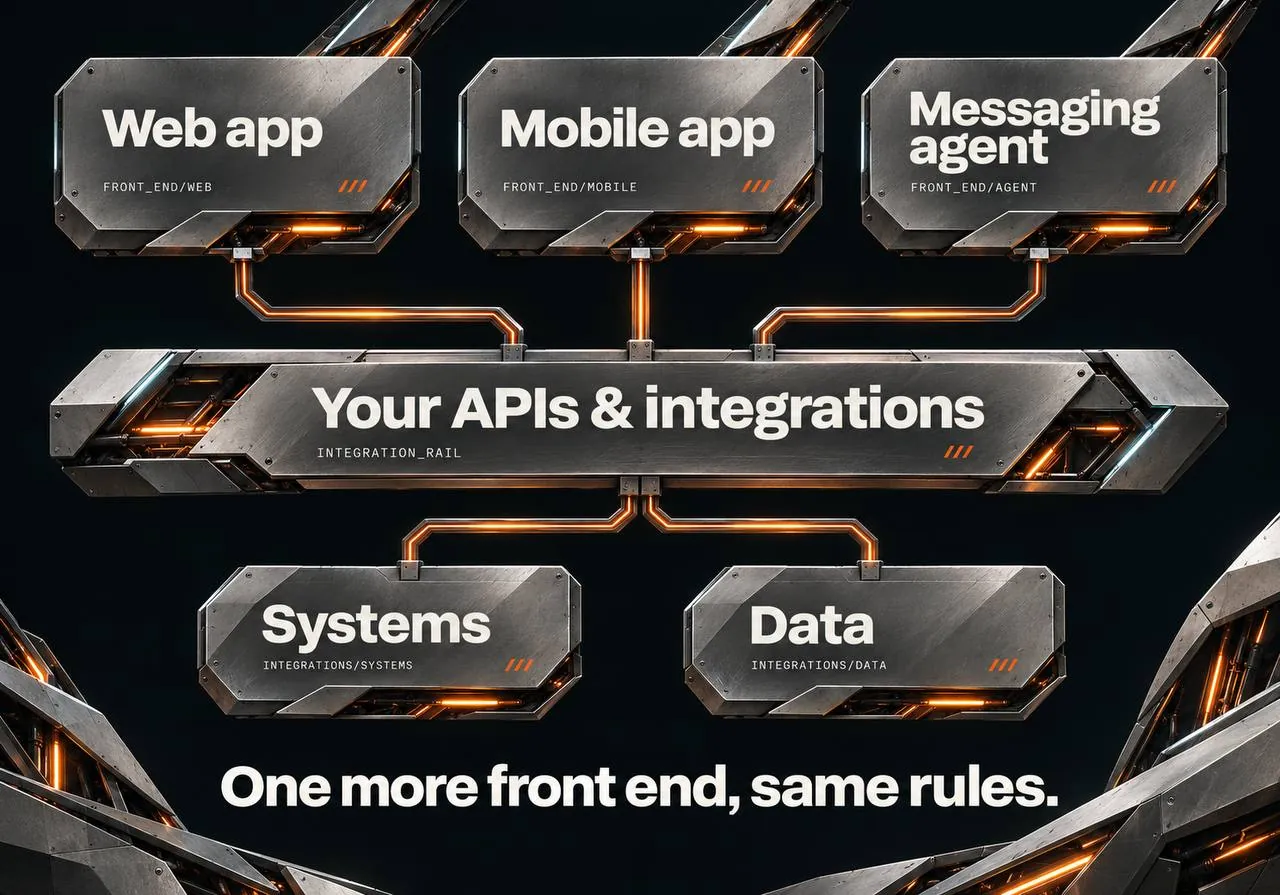
If your systems do not yet talk to each other, that is the real first project. The chat interface is only as good as the connections behind it.
Decide what the agent may do: read, propose, act
A simple way to scope a messaging agent is to sort every capability into three levels:
- Read. Answer questions and show data: order status, account history, weekly figures. Low risk, high value, fast to validate. Start here.
- Propose. Prepare a change and show it back for confirmation: "Reschedule delivery for order 1182 to Friday?" A person confirms with one tap.
- Act. Perform a change without confirmation. Reserve this for narrow, reversible, well-tested operations — and only after the first two levels have earned trust.
Most of the business value sits in the first two levels. Most of the risk sits in the third.
Choose the channel by the audience
Different messengers serve different jobs:
- Slack or Microsoft Teams for internal users who already work there.
- Telegram for fast pilots and internal tools: its bot platform is open and supports buttons and mini-apps.
- WhatsApp for customers in many markets. Its platform rules for AI are stricter, so it fits an assistant that serves your own customers rather than a general-purpose chatbot.
- iMessage and SMS for consumer audiences, typically through specialist providers such as Photon.
Pick one channel for the first release. Supporting several later is an integration task, not a redesign — if the agent is built as a client of your systems.

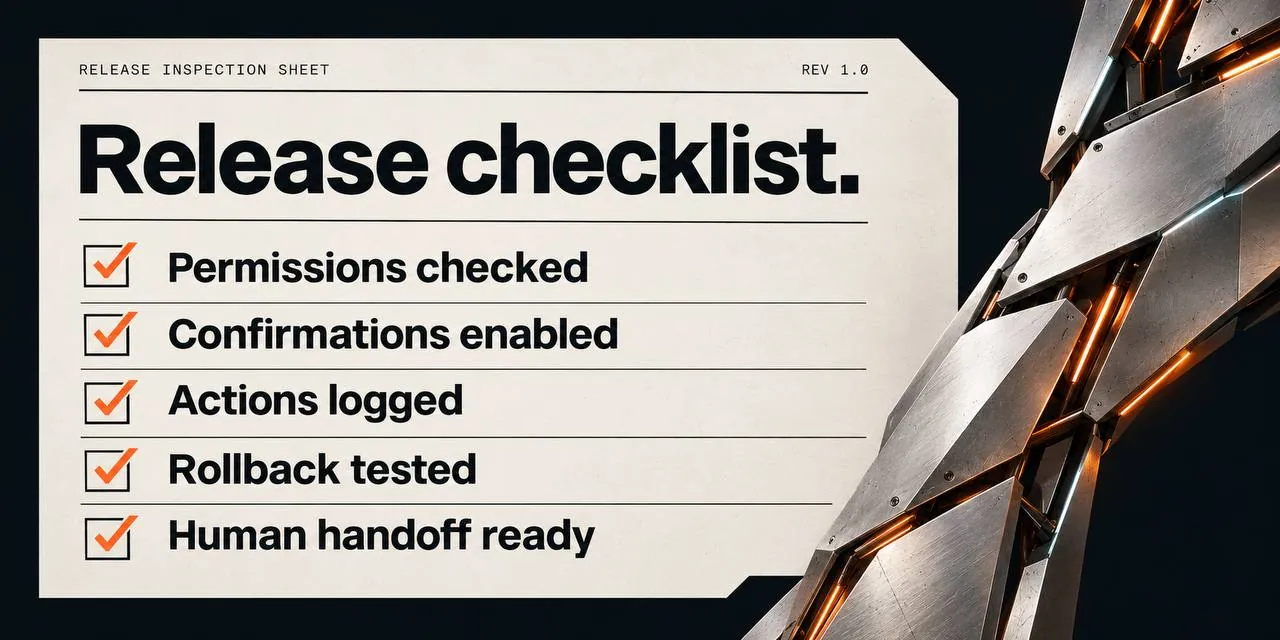
What needs to be true before release
- Evaluation cases. A written set of real questions with expected answers, run before every change to the agent.
- Permission checks. Tests that prove a user cannot read or change data through the chat that they could not reach in the web app.
- Confirmation and recovery. Every write operation can be confirmed, logged and undone.
- A route to a person. Users can always reach a human, and they are told when they are talking to an AI system.
- Named ownership. Someone owns the agent's behavior after launch, just as someone owns the application.
A sensible first scope
Choose one audience, one channel and three to five questions that currently cost people time. Make them answerable in chat, read-only, using your existing systems. Measure whether people use it and where the answers fall short. Then add the first "propose" operation.
That scope is small enough to deliver and evaluate quickly, and it produces evidence for the larger decision: how much of your product should be reachable through a conversation.
Source: Sarah Perez, "Photon held a funeral for mobile apps. Now it has $4.5M to help replace them with agents," TechCrunch, October 1, 2026.